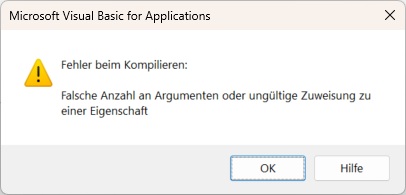
Die Quelle für die Verbindung Filmeactor ist die Abfrage einzeln...
let

    Quelle = Excel.CurrentWorkbook(){[Name="einzeln"]}[Content],

    #"Geänderter Typ" = Table.TransformColumnTypes(Quelle,{{"a", type text}, {"b", type text}, {"c", type datetime}, {"d", type text}, {"e", type text}, {"f", type datetime}, {"g", Int64.Type}, {"h", Int64.Type}, {"i", Int64.Type}, {"j", type text}}),

    #"Hinzugefügte benutzerdefinierte Spalte" = Table.AddColumn(#"Geänderter Typ", "Benutzerdefiniert", each [a] & " " & [d]),

    #"Entfernte Spalten" = Table.RemoveColumns(#"Hinzugefügte benutzerdefinierte Spalte",{"a", "b", "c", "d", "f", "g", "h", "i", "j"}),

    #"Neu angeordnete Spalten" = Table.ReorderColumns(#"Entfernte Spalten",{"Benutzerdefiniert", "e"}),

    #"Umbenannte Spalten" = Table.RenameColumns(#"Neu angeordnete Spalten",{{"Benutzerdefiniert", "a"}, {"e", "b"}})

in

    #"Umbenannte Spalten"
die hab ich mit der obigen Verbindung auf das reduziert, was ich für den nested join in dieser Abfrage unten brauche
let
Quelle = Excel.CurrentWorkbook(){[Name="Tabelle7"]}[Content],
#"Geänderter Typ" = Table.TransformColumnTypes(Quelle,{{"1", type text}, {"2", type text}, {"3", type text}, {"4", type text}, {"5", type text}, {"6", type text}, {"7", type text}, {"8", type text}, {"9", type text}, {"10", type text}, {"11", type text}, {"12", type text}, {"13", type text}, {"14", type text}, {"15", type text}, {"16", type text}, {"17", type text}, {"18", type text}, {"19", type text}, {"20", type text}, {"21", type text}, {"22", type text}, {"23", type any}, {"24", type any}, {"25", type any}, {"26", type any}, {"27", type any}, {"28", type any}, {"29", type any}, {"30", type any}, {"31", type any}, {"32", type any}, {"33", type any}, {"34", type any}, {"35", type any}, {"36", type any}, {"37", type any}, {"38", type any}, {"39", type any}, {"40", type any}, {"41", type any}, {"42", type any}, {"43", type any}, {"44", type any}, {"45", type any}, {"46", type any}, {"47", type any}, {"48", type any}, {"49", type any}, {"50", type any}, {"51", type any}, {"52", type any}, {"53", type any}, {"54", type any}, {"55", type any}, {"56", type any}, {"57", type any}, {"58", type any}, {"59", type any}, {"60", type any}, {"61", type any}, {"62", type any}, {"63", type any}, {"64", type any}, {"65", type any}, {"66", type any}, {"67", type any}, {"68", type any}, {"69", type any}, {"70", type any}, {"71", type any}, {"72", type any}, {"73", type any}, {"74", type any}, {"75", type any}, {"76", type any}, {"77", type any}, {"78", type any}, {"79", type any}, {"80", type any}, {"81", type any}, {"82", type any}, {"83", type any}, {"84", type any}, {"85", type any}, {"86", type any}, {"87", type any}, {"88", type any}, {"89", type any}, {"90", type any}, {"91", type any}, {"92", type any}, {"93", type any}, {"94", type any}, {"95", type any}, {"96", type any}, {"97", type any}, {"98", type any}, {"99", type any}, {"100", type any}, {"101", type any}, {"102", type any}, {"103", type any}, {"104", type any}, {"105", type any}, {"106", type any}, {"107", type any}, {"108", type any}, {"109", type any}, {"110", type any}, {"111", type any}, {"112", type any}, {"113", type any}, {"114", type any}, {"115", type any}, {"116", type any}, {"117", type any}, {"118", type any}, {"119", type any}, {"120", type any}, {"121", type any}, {"122", type any}, {"123", type any}, {"124", type any}, {"125", type any}, {"126", type any}, {"127", type any}, {"128", type any}, {"129", type any}, {"130", type any}, {"131", type any}, {"132", type any}, {"133", type any}, {"134", type any}, {"135", type any}, {"136", type any}, {"137", type any}, {"138", type any}, {"139", type any}, {"140", type any}, {"141", type any}, {"142", type any}, {"143", type any}, {"144", type any}, {"145", type any}, {"146", type any}, {"147", type any}, {"148", type any}, {"149", type any}, {"150", type any}, {"151", type any}, {"152", type any}, {"153", type any}, {"154", type any}, {"155", type any}, {"156", type any}, {"157", type any}, {"158", type any}, {"159", type any}, {"160", type any}, {"161", type any}, {"162", type any}, {"163", type any}, {"164", type any}, {"165", type any}, {"166", type any}, {"167", type any}, {"168", type any}, {"169", type any}, {"170", type any}, {"171", type any}, {"172", type any}, {"173", type any}, {"174", type any}, {"175", type any}, {"176", type any}, {"177", type any}, {"178", type any}, {"179", type any}, {"180", type any}, {"181", type any}, {"182", type any}, {"183", type any}, {"184", type any}, {"185", type any}, {"186", type any}, {"187", type any}, {"188", type any}, {"189", type any}, {"190", type any}, {"191", type any}, {"192", type any}, {"193", type any}, {"194", type any}, {"195", type any}}),
#"Entfernte Spalten" = Table.RemoveColumns(#"Geänderter Typ",{"1"}),
#"Entpivotierte andere Spalten" = Table.Buffer(Table.UnpivotOtherColumns(#"Entfernte Spalten", {"2", "3"}, "Attribut", "Wert")),
#"Entfernte Spalten2" = Table.RemoveColumns(#"Entpivotierte andere Spalten",{"Attribut"}),
#"Gefilterte Zeilen" = Table.Buffer(Table.SelectRows(#"Entfernte Spalten2", each Text.StartsWith([2], "tt"))),
#"Gefilterte Zeilen1" = Table.Buffer(Table.SelectRows(#"Gefilterte Zeilen", each Text.EndsWith([Wert], "jpg"))),
#"Hinzugefügte benutzerdefinierte Spalte" = Table.AddColumn(#"Gefilterte Zeilen1", "Benutzerdefiniert", each [2] & " " & [3]),
#"Entfernte Spalten1" = Table.RemoveColumns(#"Hinzugefügte benutzerdefinierte Spalte",{"2", "3", "Wert"}),
#"Umbenannte Spalten" = Table.RenameColumns(#"Entfernte Spalten1",{{"Benutzerdefiniert", "a"}}),
#"Zusammengeführte Abfragen" = Table.NestedJoin(#"Umbenannte Spalten", {"a"}, Filmeactor, {"a"}, "Filmeactor", JoinKind.Inner),
#"Erweiterte Filmeactor" = Table.ExpandTableColumn(#"Zusammengeführte Abfragen", "Filmeactor", {"b"}, {"Filmeactor.b"}),
#"Entfernte Spalten3" = Table.RemoveColumns(#"Erweiterte Filmeactor",{"a"}),
#"Entfernte Duplikate" = Table.Buffer(Table.Distinct(#"Entfernte Spalten3")),
#"Sortierte Zeilen" = Table.Buffer(Table.Sort(#"Entfernte Duplikate",{{"Filmeactor.b", Order.Ascending}})),
#"Umbenannte Spalten1" = Table.RenameColumns(#"Sortierte Zeilen",{{"Filmeactor.b", "a"}})
in
#"Umbenannte Spalten1"
hier nochmal das Makro, in dem wie du siehst die Aktualisierung von Filmeactor auskommentiert ist, die Frage ist jetzt wenn MRS aktualisiert wird, ist dann Filmeactor auf dem Stand vor oder nachdem einzeln aktualisiert wurde. Und wenn es noch auf dem alten Stand ist, wie bekomme ich es auf den neuen Stand, wenn ich das ' davor wegnehme kommt es zu dem Fehler Index außerhalb des gültigen Bereichs.
Public Sub UpdateQueriesAndCalculate()

    Dim wsErgebnis As Worksheet

    Dim wsFilme As Worksheet

    Dim wsLeute As Worksheet

    Dim wsRechnung As Worksheet

    Dim wsKontrolle As Worksheet

    Dim lastRowErgebnis As Long

    Dim lastRowFilme As Long

    Dim lastRowLeute As Long

    Dim lastRowKontrolleA As Long

    Dim lastRowKontrolleN As Long

    Dim lastRowKontrolleQ As Long

    Dim lastRowKontrolleW As Long

    Dim lastRowRechnungA As Long

    Dim lastRowRechnungN As Long

    Dim lastRowRechnungQ As Long

    Dim lastRowRechnungW As Long

    Dim wksSheet As Worksheet


    ' Arbeitsblätter setzen

    Set wsErgebnis = ThisWorkbook.Worksheets("Ergebnis")

    Set wsFilme = ThisWorkbook.Worksheets("Filme")

    Set wsLeute = ThisWorkbook.Worksheets("Leute")

    Set wsRechnung = ThisWorkbook.Worksheets("Rechnung")

    Set wsKontrolle = ThisWorkbook.Worksheets("Kontrolle")


    ' Bildschirmaktualisierung und Formelberechnung deaktivieren

    Application.ScreenUpdating = False

    Application.Calculation = xlCalculationManual


    ' Entfernen aller Filter in den Tabellenblättern

    For Each wksSheet In ThisWorkbook.Worksheets

        On Error Resume Next ' Fehler ignorieren, falls kein Filter vorhanden ist

        If wksSheet.AutoFilterMode Then

            wksSheet.AutoFilterMode = False

        End If

        On Error GoTo 0 ' Fehlerbehandlung zurücksetzen

    Next wksSheet


    ' Inhalt von Blatt "Kontrolle" löschen

    wsKontrolle.Range("A:V").Clear


    ' Spalten A bis Z aus dem Blatt "Rechnung" in das Blatt "Kontrolle" kopieren

    wsRechnung.Range("A:U").Copy

    wsKontrolle.Range("A1").PasteSpecial xlPasteValuesAndNumberFormats

    Application.CutCopyMode = False


    ' Aktualisiere die Abfragen namens Filme und Leute

    Range("Filme").ListObject.QueryTable.Refresh BackgroundQuery:=False

    Range("Leute").ListObject.QueryTable.Refresh BackgroundQuery:=False


    ' Berechne die letzten Zeilen für das Blatt "Filme", "Leute" und "Ergebnis"

    lastRowFilme = wsFilme.Cells(wsFilme.Rows.Count, "B").End(xlUp).Row

    lastRowLeute = wsLeute.Cells(wsLeute.Rows.Count, "B").End(xlUp).Row

    lastRowErgebnis = wsErgebnis.Cells(wsErgebnis.Rows.Count, "A").End(xlUp).Row


    ' Berechnung der Werte für Spalte B

    wsErgebnis.Range("B2:B" & lastRowErgebnis).FormulaLocal = "=XVERWEIS(A2;Filme!B$2:B$" & lastRowFilme & ";Filme!C$2:C$" & lastRowFilme & ";"""")"


    ' Berechnung der Werte für Spalte C

    wsErgebnis.Range("C2:C" & lastRowErgebnis).FormulaLocal = "=WENN(XVERWEIS(A2;Filme!B$2:B$" & lastRowFilme & ";Filme!E$2:E$" & lastRowFilme & ";"""")="""";"""";XVERWEIS(A2;Filme!B$2:B$" & lastRowFilme & ";Filme!E$2:E$" & lastRowFilme & ";""""))"


    ' Berechnung der Werte für Spalte E

    wsErgebnis.Range("E2:E" & lastRowErgebnis).FormulaLocal = "=XVERWEIS(D2;Leute!B$2:B$" & lastRowLeute & ";Leute!C$2:C$" & lastRowLeute & ";"""")"


    ' Berechnung der Werte für Spalte F

    wsErgebnis.Range("F2:F" & lastRowErgebnis).FormulaLocal = "=WENN(XVERWEIS(D2;Leute!B$2:B$" & lastRowLeute & ";Leute!D$2:D$" & lastRowLeute & ";"""")="""";"""";XVERWEIS(D2;Leute!B$2:B$" & lastRowLeute & ";Leute!D$2:D$" & lastRowLeute & ";""""))"


    ' Werte in den Formeln umwandeln

    wsErgebnis.Range("B2:F" & lastRowErgebnis).Value2 = wsErgebnis.Range("B2:F" & lastRowErgebnis).Value2


    ' Sortieren des Blattes "Ergebnis"

    With wsErgebnis.Sort

        .SortFields.Clear

        .SortFields.Add key:=wsErgebnis.Range("C2:C" & lastRowErgebnis), Order:=xlDescending

        .SortFields.Add key:=wsErgebnis.Range("F2:F" & lastRowErgebnis), Order:=xlDescending

        .SetRange wsErgebnis.Range("A1:G" & lastRowErgebnis) ' Bereich der zu sortierenden Daten

        .Header = xlYes ' Wenn die erste Zeile Kopfzeilen enthält

        .Apply

    End With


    ' Aktualisiere die weiteren Abfragen: einzeln, Filmeactor, MRS, Videos, Punkte

    Range("einzeln").ListObject.QueryTable.Refresh BackgroundQuery:=False

    'ThisWorkbook.Connections("Filmeactor").Refresh 'BackgroundQuery:=False

    Range("MRS").ListObject.QueryTable.Refresh BackgroundQuery:=False

    Range("Videos").ListObject.QueryTable.Refresh BackgroundQuery:=False

    Range("Punkte").ListObject.QueryTable.Refresh BackgroundQuery:=False

    Range("U_25").ListObject.QueryTable.Refresh BackgroundQuery:=False


    ' Berechne die letzten Zeilen für das Blatt "Rechnung"

    lastRowRechnungA = wsRechnung.Cells(wsRechnung.Rows.Count, "A").End(xlUp).Row

    lastRowRechnungN = wsRechnung.Cells(wsRechnung.Rows.Count, "N").End(xlUp).Row

    lastRowRechnungQ = wsRechnung.Cells(wsRechnung.Rows.Count, "Q").End(xlUp).Row

    lastRowRechnungW = wsRechnung.Cells(wsRechnung.Rows.Count, "W").End(xlUp).Row


    ' Berechne die letzten Zeilen für das Blatt "Kontrolle"

    lastRowKontrolleA = wsKontrolle.Cells(wsKontrolle.Rows.Count, "A").End(xlUp).Row

    lastRowKontrolleN = wsKontrolle.Cells(wsKontrolle.Rows.Count, "N").End(xlUp).Row

    lastRowKontrolleQ = wsKontrolle.Cells(wsKontrolle.Rows.Count, "Q").End(xlUp).Row

    lastRowKontrolleW = wsKontrolle.Cells(wsKontrolle.Rows.Count, "W").End(xlUp).Row


    ' Berechnung der Werte für verschiedene Spalten in der Rechnung und Kontrolle

    wsRechnung.Range("L2:L" & lastRowRechnungA).FormulaLocal = "=ZÄHLENWENN(Kontrolle!J:J;J2)"

    wsKontrolle.Range("L2:L" & lastRowKontrolleA).FormulaLocal = "=ZÄHLENWENN(Rechnung!J:J;J2)"

    wsRechnung.Range("O2:O" & lastRowRechnungN).FormulaLocal = "=ZÄHLENWENN(Kontrolle!N:N;N2)"

    wsKontrolle.Range("O2:O" & lastRowKontrolleN).FormulaLocal = "=ZÄHLENWENN(Rechnung!N:N;N2)"

    wsRechnung.Range("U2:U" & lastRowRechnungQ).FormulaLocal = "=ZÄHLENWENN(Kontrolle!S:S;S2)"

    wsKontrolle.Range("U2:U" & lastRowKontrolleQ).FormulaLocal = "=ZÄHLENWENN(Rechnung!S:S;S2)"

    wsRechnung.Range("Z2:Z" & lastRowRechnungW).FormulaLocal = "=ZÄHLENWENN(Kontrolle!X:X;W2)"

    wsKontrolle.Range("AA2:AA" & lastRowKontrolleW).FormulaLocal = "=ZÄHLENWENN(Rechnung!W:W;X2)"


    ' Werte in den Formeln umwandeln

    wsRechnung.Range("L2:L" & lastRowRechnungA).Value2 = wsRechnung.Range("L2:L" & lastRowRechnungA).Value2

    wsKontrolle.Range("L2:L" & lastRowKontrolleA).Value2 = wsKontrolle.Range("L2:L" & lastRowKontrolleA).Value2

    wsRechnung.Range("O2:O" & lastRowRechnungN).Value2 = wsRechnung.Range("O2:O" & lastRowRechnungN).Value2

    wsKontrolle.Range("O2:O" & lastRowKontrolleN).Value2 = wsKontrolle.Range("O2:O" & lastRowKontrolleN).Value2

    wsRechnung.Range("U2:U" & lastRowRechnungQ).Value2 = wsRechnung.Range("U2:U" & lastRowRechnungQ).Value2

    wsKontrolle.Range("U2:U" & lastRowKontrolleQ).Value2 = wsKontrolle.Range("U2:U" & lastRowKontrolleQ).Value2

    wsRechnung.Range("Z2:Z" & lastRowRechnungW).Value2 = wsRechnung.Range("Z2:Z" & lastRowRechnungW).Value2

    wsKontrolle.Range("AA2:AA" & lastRowKontrolleW).Value2 = wsKontrolle.Range("AA2:AA" & lastRowKontrolleW).Value2


    ' Schriftart zu kursiv ändern und Inhalte zentrieren (außer "Liste")

    For Each wksSheet In ThisWorkbook.Worksheets

        If wksSheet.Name > "Liste" Then

            wksSheet.Cells.Font.Italic = True

            wksSheet.Cells.HorizontalAlignment = xlCenter ' Zentriert die Inhalte in den Zellen

            wksSheet.Cells.Columns.AutoFit

        End If

    Next wksSheet


    ' Bildschirmaktualisierung und Formelberechnung wieder aktivieren

    Application.ScreenUpdating = True

    Application.Calculation = xlCalculationAutomatic

End Sub