Umstellung auf CDO.message HTMLBody Tabelle, Hilfe nötig
11.01.2025 12:19:33
Karsten Jung
ich muss eine Einsatzplanung per VBA als Mail verschicken.
Bisher hat das super geklappt mit folgenden Makro:
        'Tabellenbereich einfügen'

        Dim WSh1 As Worksheet, WSh2 As Worksheet

        Dim sBer As String

        ThisWorkbook.Worksheets("E-Mail").Range("A1:H76").Copy                          ' Bereich kopieren

        With CreateObject("Outlook.Application").CreateItem(0)

            .BodyFormat = 3                           ' 2=HTML-Format

            .Subject = "Einsatzplanung für den Zeitraum " & Format(DTPicker1, "dd.mm.yy") & " bis " & Format(DTPicker1 + 6, "dd.mm.yy")                     ' Betreff

            .Display

            .To = "k.j@*****.**"

            .GetInspector.WordEditor.Range.Paste      ' Bereich in Mail einfügen

            Application.CutCopyMode = False

            .Send

        End With
Jetzt wurden die PC`s in der Firma umgestellt und wir arbeiten aus Citrix Servern mit Office und dort ist dann natürlich kein Outlook aktiv.
Wenn der o.g. Makro startet, öffnet sich eine Online-Outlook Variante, wo dann aber Pop-Ups kommen, die verlangen, diese Aktion freizugeben.
Bei der zweiten Abfrage, wenn die den Datenbereich einfüge, sogar mit eine Timer bevor man klicken kann.
Dafür gibt es bestimmt keine Umgehung, oder?
Deshalb habe ich mich mit den CDO.message beschäftigt und die Tabelle soweit auch nachgebaut bekommen.
Was extrem kompliziert war. (vielleicht habe ich es auch nur zu kompliziert gebaut, keine Ahnung)
Sub E_Mail_erstellen
ThisWorkbook.Worksheets("AR").Select
text = ""
Überschrift = "Einsatzplanung für den " & ThisWorkbook.Worksheets("AR").Cells(1, 7)
AB = "AR"
'Überschrift
text = text & "" 'Tabelle definieren, Rahmen um Tabelle"
text = text & "" & Überschrift & " " 'Überschrift
For Zeile = 1 To 45
If Zeile = 25 Then Zeile = 42
text = text & "" 'neue Zeile
If Zeile = 44 Then
text = text & "" & "IH,ASi, AR
Meistervertretung" & " "
GoTo Zeile1a
End If
If Zeile = 42 Then
text = text & "" & ThisWorkbook.Worksheets(AB).Cells(Zeile, 1) & " "
Else
If Zeile > 1 Then
If Zeile > 43 And Zeile > 45 Then
Call Farbe3(Zeile, AB, text, 1, True)
End If
Else
text = text & "" & "" & " "
End If
End If
Zeile1a:
If ThisWorkbook.Worksheets(AB).Cells(Zeile, 2) = "0" Then
text = text & "" & "" & " "
Else
If Zeile = 1 Then
text = text & "" & ThisWorkbook.Worksheets(AB).Cells(Zeile, 2) & " "
Else
Call Farbe3(Zeile, AB, text, 2, False)
End If
End If
If ThisWorkbook.Worksheets(AB).Cells(Zeile, 3) = "0" Then
text = text & "" & "" & " "
Else
If Zeile = 1 Then
text = text & "" & ThisWorkbook.Worksheets(AB).Cells(Zeile, 3) & " "
Else
Call Farbe3(Zeile, AB, text, 3, False)
End If
End If
If ThisWorkbook.Worksheets(AB).Cells(Zeile, 4) = "0" Then
text = text & "" & "" & " "
Else
If Zeile = 6 Or Zeile = 7 Then
If Zeile = 6 Then text = text & "" & ThisWorkbook.Worksheets(AB).Cells(Zeile, 4) & " "
Else
If Zeile = 1 Then
text = text & "" & ThisWorkbook.Worksheets(AB).Cells(Zeile, 4) & " "
Else
Call Farbe3(Zeile, AB, text, 4, False)
End If
End If
End If
If ThisWorkbook.Worksheets(AB).Cells(Zeile, 5) = "0" Then
text = text & "" & "" & " "
Else
If Zeile > 3 And Zeile 6 Or Zeile > 7 And Zeile 17 Or Zeile > 22 And Zeile 25 Then
Call Farbe3(Zeile, AB, text, 5, True)
Else
If Zeile = 1 Then
text = text & "" & ThisWorkbook.Worksheets(AB).Cells(Zeile, 5) & " "
Else
Call Farbe3(Zeile, AB, text, 5, False)
End If
End If
End If
If ThisWorkbook.Worksheets(AB).Cells(Zeile, 6) = "0" Then
text = text & "" & "" & " "
Else
If Zeile = 1 Or Zeile = 2 Or Zeile > 16 And Zeile 22 Then
If Zeile = 1 Then
text = text & "" & ThisWorkbook.Worksheets(AB).Cells(Zeile, 6) & " "
Else
Call Farbe3(Zeile, AB, text, 6, True)
End If
Else
Call Farbe3(Zeile, AB, text, 6, False)
End If
End If
If ThisWorkbook.Worksheets(AB).Cells(Zeile, 7) = "0" Then
text = text & "" & "" & " "
Else
Call Farbe3(Zeile, AB, text, 7, False)
End If
text = text & " " 'Zeilenende
Next Zeile
'Tabellenende deklarieren
text = text & "
"
Set iMsg = CreateObject("CDO.Message")
Set iConf = CreateObject("CDO.Configuration")
iConf.Load -1
Set Flds = iConf.Fields
With Flds
.Item("http://schemas.microsoft.com/cdo/configuration/sendusing") = 2
.Item("http://schemas.microsoft.com/cdo/configuration/smtpserver") = "******"
.Item("http://schemas.microsoft.com/cdo/configuration/sendpassword") = "******"
.Item("http://schemas.microsoft.com/cdo/configuration/smtpserverport") = ***
.Update
End With
With iMsg
Set .Configuration = iConf
.To = "k.j@*****.**"
.cc = cc
.BCC = BCC
.From = "****@*****.**"
.Subject = "Test AR2"
.HTMLBody = text
'.AddAttachment = Dateianhang
.Send
End With
End Sub
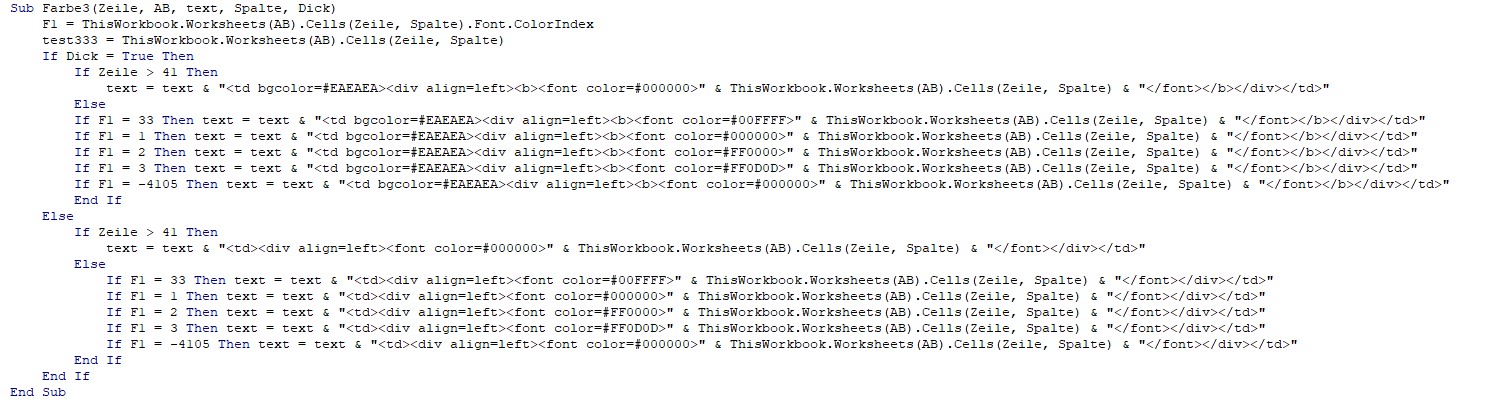
Hier das "Uuntermakro"
Das mit Zeile >41 musste ich einbauen, weil er schwarze Schrift als rot ausliest, keine Ahnung warum.
Sub Farbe3(Zeile, AB, text, Spalte, Dick)
F1 = ThisWorkbook.Worksheets(AB).Cells(Zeile, Spalte).Font.ColorIndex
test333 = ThisWorkbook.Worksheets(AB).Cells(Zeile, Spalte)
If Dick = True Then
If Zeile > 41 Then
text = text & "" & ThisWorkbook.Worksheets(AB).Cells(Zeile, Spalte) & " "
Else
If F1 = 33 Then text = text & "" & ThisWorkbook.Worksheets(AB).Cells(Zeile, Spalte) & " "
If F1 = 1 Then text = text & "" & ThisWorkbook.Worksheets(AB).Cells(Zeile, Spalte) & " "
If F1 = 2 Then text = text & "" & ThisWorkbook.Worksheets(AB).Cells(Zeile, Spalte) & " "
If F1 = 3 Then text = text & "" & ThisWorkbook.Worksheets(AB).Cells(Zeile, Spalte) & " "
If F1 = -4105 Then text = text & "" & ThisWorkbook.Worksheets(AB).Cells(Zeile, Spalte) & " "
End If
Else
If Zeile > 41 Then
text = text & "" & ThisWorkbook.Worksheets(AB).Cells(Zeile, Spalte) & " "
Else
If F1 = 33 Then text = text & "" & ThisWorkbook.Worksheets(AB).Cells(Zeile, Spalte) & " "
If F1 = 1 Then text = text & "" & ThisWorkbook.Worksheets(AB).Cells(Zeile, Spalte) & " "
If F1 = 2 Then text = text & "" & ThisWorkbook.Worksheets(AB).Cells(Zeile, Spalte) & " "
If F1 = 3 Then text = text & "" & ThisWorkbook.Worksheets(AB).Cells(Zeile, Spalte) & " "
If F1 = -4105 Then text = text & "" & ThisWorkbook.Worksheets(AB).Cells(Zeile, Spalte) & " "
End If
End If
End Sub
Soweit so gut.
Aber ich komme mit einigen Punkten nicht weiter.
1. Wie drehe ich die Schrift um 90° in einer bestimmten Zelle?
2. Wie färbe ich den Hintergrund einer Zelle der Tabelle farbig, am besten mit einer Variablen?
3. Wie kann ich mit einer Variablen füllen?
oder so ähnlich?
Vielleicht kann jemand noch eine Vereinfachung meine komplizierten Programmierung sehen und mir mitteilen.
Wäre super.
Danke im Voraus.
Gruß
Karsten
Anzeige